Single-player fun
Infinite health, ammo, or gold in story-driven games. Speed up grinding or slow down difficult sections with Speedhack.
The free way to inspect and change values in any Windows process. Use the scanner and debugger for single-player games, learn how memory and pointers work, and build .CT tables or Lua scripts to share.
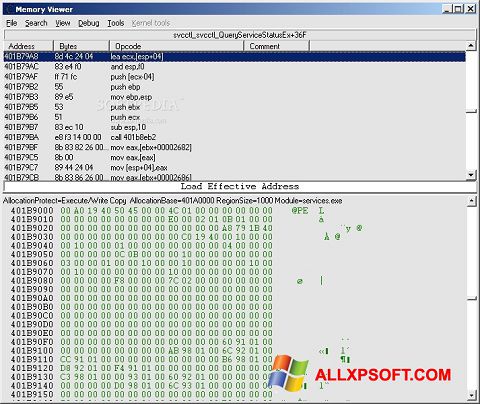 Process & scan
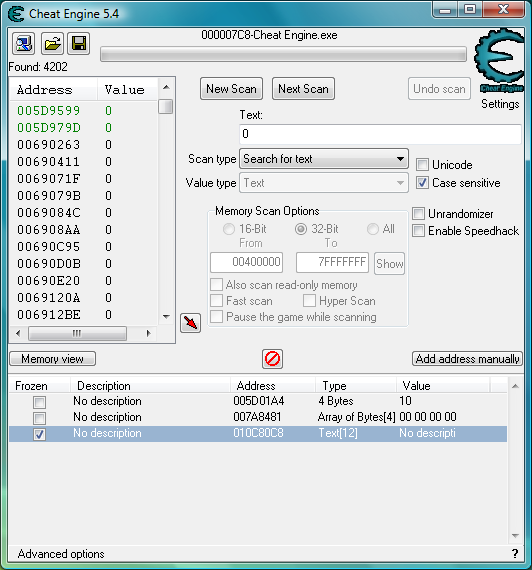 Interface
One tool. No subscription. Used by learners and modders worldwide.
No paywall, no premium tier. Full source on GitHub. Donations optional.
Works with both architectures. Attach to any Windows process and scan.
Script anything: automate scans, build UIs, share one-click cheats.
Learn scanning and debugging in minutes. No game needed—included after install.
From zero to your first cheat in minutes. No prior experience needed.
Get the latest Cheat Engine from the official site or our download section. Run the installer; you can skip the optional bundled software. Restart if prompted.
From the Start Menu, open “Cheat Engine Tutorial.” It’s a small program that teaches First Scan, Next Scan, and freezing values. Complete at least steps 1–3 to understand the basics.
Start a game where a value is easy to see (e.g. health, gold, ammo). Attach CE to the game process via the process list (computer icon). Make sure the game is running before you attach.
Enter the current value (e.g. 100 health), choose the correct value type (4 Bytes, Float, etc.), then click First Scan. Change the value in the game (take damage, spend gold), enter the new value, click Next Scan. Repeat until few addresses remain.
Double-click an address to add it to the list below. Change the value or check “Active” to freeze it. If the game doesn’t react, try another address from the scan results.
Cheat Engine reads the memory of the attached process and filters it by the value and type you specify. Understanding this helps you scan smarter.
You enter a value (e.g. 50) and the type (4 Bytes, 8 Bytes, Float, Double, String, etc.). CE scans the entire process memory and lists every address where that value appears. There can be thousands or millions of matches.
Use “Unknown initial value” when you don’t know the number (e.g. for encrypted or unknown formats). Then use “Increased value,” “Decreased value,” or “Changed/Unchanged value” for next scans.
After you change the value in the game (e.g. health goes from 50 to 45), you enter the new value and click Next Scan. CE keeps only addresses that now contain that value. Each next scan narrows the list.
Usually 2–5 scans are enough for simple values. For harder cases use “Value between,” “Bigger than,” or “Smaller than” to filter further.
If you get too many results, change the value in the game again and do another Next Scan. If you get zero results, the value might be stored differently (e.g. multiplied, in a different type, or on the server). Try “Unknown initial value” or check our guides.
What people use Cheat Engine for—from casual fun to serious learning.
Infinite health, ammo, or gold in story-driven games. Speed up grinding or slow down difficult sections with Speedhack.
See how games store data in memory. Use the debugger to find which code reads/writes an address. Great for security and game-dev curiosity.
Save your findings in a cheat table. Share the .CT file so others can load it and use the same cheats without scanning from scratch.
Write scripts to auto-scan, batch-edit values, or build a custom in-game UI. The forum has many examples and helpers.
Speedhack and memory edits are sometimes used in speedruns or by developers to test their own games quickly.
Teachers use CE to explain memory layout, pointers, and process memory. The tutorial is ideal for classroom use.
Finds a chain of pointers to an address so your cheat still works after the game restarts or updates.
Explore structures and arrays in memory. Useful when values are inside nested structs or classes.
Inject custom assembly code: replace instructions, add jumps, or patch the game at the code level.
Kernel-level driver for advanced use (e.g. bypassing some protections). Optional; normal use doesn’t require it.
Cheat Engine runs on Windows 7 and later (32-bit and 64-bit). You need administrator rights to attach to most processes. Antivirus may flag it; add an exception for the install folder if you use the official build.
For 64-bit games, use the 64-bit CE build. For 32-bit games, the 32-bit build is typically used.
A Mac version exists but is less mature than the Windows version. Check the download page and forum for current status and limitations.
One free tool for scanning memory, setting breakpoints, controlling speed, and writing scripts. Built for learners and modders.
Search for exact or unknown values. Narrow results with next scan. Supports integers, floats, doubles, and strings.
See which code reads or writes an address. Step through assembly and inject or patch instructions.
Speedhack slows or speeds game time. Handy for tough fights or boring grind in single-player.
Save addresses and scripts in a table. Reload next time or share with others. Generate a standalone trainer if you like.
Automate scans, change many values at once, or build a custom UI. The forum has plenty of examples to learn from.
Pointer scan finds stable paths so your cheat works after restart. Save and reuse pointer maps for updates.
Progress from basics to advanced at your own pace.
Complete CE tutorial steps 1–6. Find and freeze one value in a real game.
Find health, ammo, gold. Try Float, 8 Bytes. Use “Unknown initial value” and “Changed value.”
Find what writes/reads an address. Step through assembly. Try simple Auto Assembler scripts.
Pointer scan, save tables, share with others. Use dissect data for structures.
Write Lua scripts. Build custom UIs. Automate scans and batch edits.
Health, mana, gold, experience—often 4 Bytes or Float. Try “Exact value” first; if the number on screen doesn’t match, it may be scaled or stored in a different type.
Ammo, health. Sometimes stored per-weapon. Use Next Scan after firing or taking damage. Float is common for health.
Resources (wood, gold, etc.) are usually integers. Scan after gaining or spending. Multiple resources mean multiple scans.
Often simpler memory layout. Good for practice. Less likely to have heavy anti-tamper.
Values may be encrypted or in structures. Pointer scan and “Unknown value” are useful. Check the forum for game-specific tips.
Browser games run in the browser process; attach to the right tab/process. Emulators: attach to the emulator; addresses may change each run—use pointers.
Cheat Engine lets you attach to any running process and read or write its memory. That makes it ideal for understanding how single-player games store health, ammo, or gold—and for changing those values for fun or learning. It also doubles as a debugger and disassembler, so you can see the code that uses an address.
The built-in tutorial (from the Start Menu after install) walks you through finding a value, freezing it, and using the debugger. No game required. Once you’re comfortable, try a real game: pick a visible value (e.g. health), scan, change it in-game, then next scan until you have a short list. Freeze or change to confirm.
CE is free and open source. Use it only on software you’re allowed to modify. For single-player that’s usually fine; for online games, assume it’s against the rules unless stated otherwise. Respect the law and each game’s terms of service.
Speedhack changes how fast the target process “sees” time. You can slow the game to 0.5x for tough fights or speed it to 2x–10x to skip grinding. It hooks time-related APIs; not all games respect it. Find it in the main CE window; set speed and enable.
Use only in single-player. Some games break visually or physically at extreme speeds.
Right-click an address → “Find out what writes to this address” (or “reads”). When the game touches that memory, CE breaks and shows the instruction. You can then step through assembly, inject code, or NOP instructions. The disassembler shows the code around the current instruction.
Essential for finding where health is written, or for creating code caves and patches.
Save your work in a .CT file and share it with the community or reuse it later.
CE embeds a Lua engine. You can automate scans, create forms and buttons, and interact with memory and the debugger from scripts.
Create custom scan dialogs, hotkeys, and UIs. Read/write memory by address. Hook functions, execute Auto Assembler from Lua, and more. Many table authors ship a single “Activate” script that does everything.
Help → Cheat Engine Lua Scripting in CE, and the Wiki. The forum has Lua subforums and example scripts. Start by opening an existing .CT with Lua and reading the script code.
Addresses often change every time you start the game. Pointer scan finds a chain of pointers from a static base (e.g. module base) to your address so the cheat works after restart.
You need a known address first (from normal scanning). Then use Tools → Pointer scan. CE searches for pointer paths; it can take minutes and use a lot of disk. When done, you filter by “must be valid” after restart and add the best pointer to your table. Our guides cover this in detail.
Cheat Engine supports plugins (DLLs) that add features. The community has created plugins for specific games, extra scan types, and utilities.
Place plugin DLLs in the CE installation folder (or the folder specified in CE settings). Restart CE to load them. Only use plugins from trusted sources; they run with the same privileges as CE. See the Resources page and the forum for lists and links.
CE can read/write other processes and load scripts. Many antivirus products flag it. The official build from cheatengine.org is safe. If you trust the source, add an exclusion for the CE folder. Do not disable AV entirely.
Use CE only on software you are allowed to modify. In single-player games this is usually fine. In online games, assume it is against the terms of service and can result in bans. Respect laws and each product’s EULA.
Cheat Engine is actively developed. New releases bring better 64-bit support, Lua improvements, and UI fixes.
Gamers
Single-player modding and fun
Learners
Reverse engineering & security
Table makers
Creating and sharing .CT files
Educators
Teaching memory & debugging
A location in process memory. CE shows addresses in hex (e.g. 0x12345678).
First scan finds all matches for a value; next scan narrows by the new value after it changes.
Keep a value unchanged. CE repeatedly writes the same value so the game can’t change it.
An address that holds another address. A pointer chain leads from a fixed base to the value.
File format that stores addresses, scripts, and descriptions. Shareable and reloadable.
How the value is stored: 4 Bytes, 8 Bytes, Float, Double, String, etc. Picking the wrong type gives wrong results.
Beyond this site, these are go-to places for guides and help.
Share tables and scripts, ask questions, and browse tutorials. The community is active and welcoming to beginners.
Game-specific tables, Lua scripts, and general help. Search before posting; many questions are already answered.
forum.cheatengine.org →Documentation, tutorials, and explanations of features like pointer scan, Auto Assembler, and Lua.
wiki.cheatengine.org →Links to Discord, social channels, and other community hubs in one place.
Community & links →Language packs, CEServer for remote debugging, plugins, and the full open-source code. All on the resources page.
Windows 32/64-bit. Get it from the Download section or the official site.
Translate the CE interface. Install and select in CE settings.
Remote debugging: run on another machine and attach from your CE client.
Full source on GitHub. Build from source or contribute.
Download Cheat Engine for Windows (and Mac), run the built-in tutorial, then explore our guides and community.